How Much Space Does Aniimo Take?
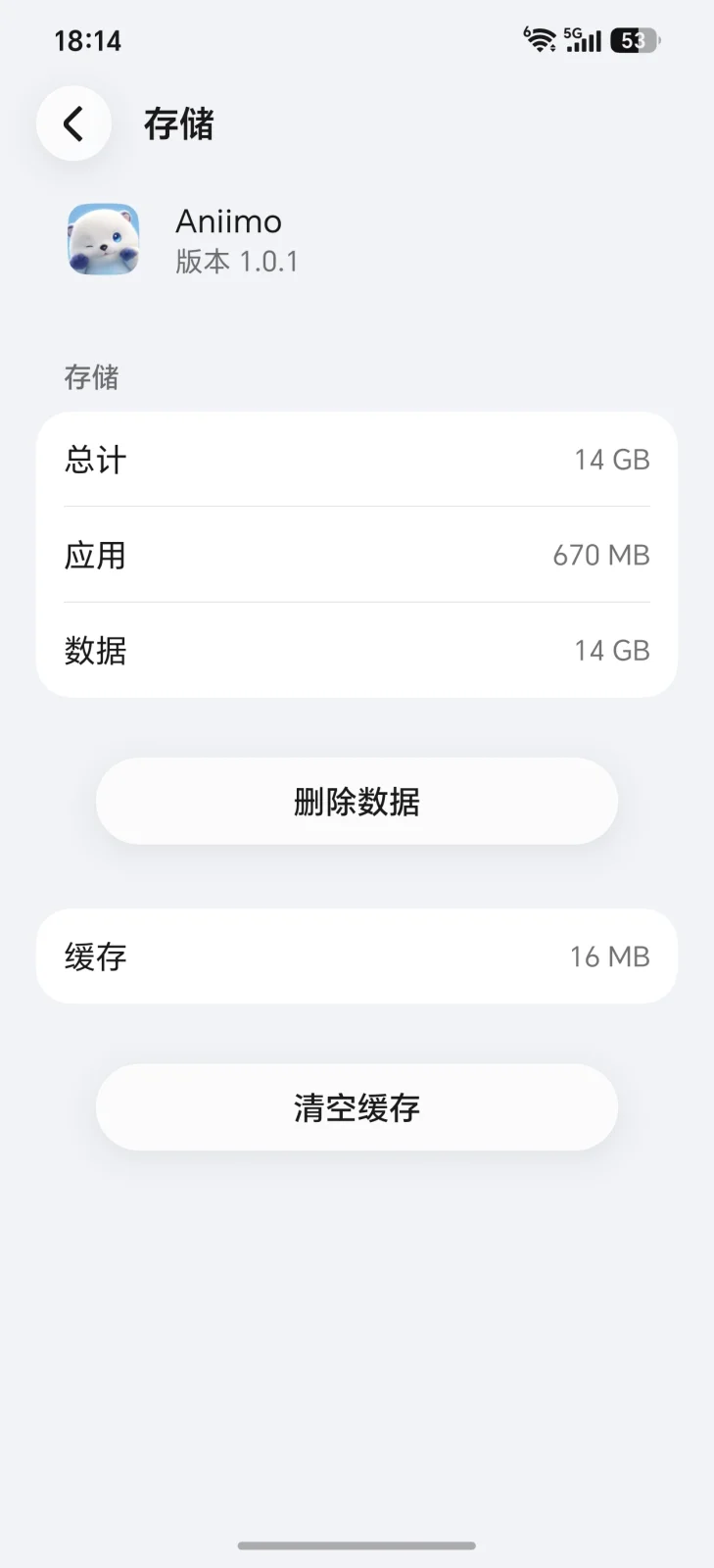
Aniimo asks for 18 GB of free space in the mobile requirements recorded on this site. The install we measured on our own Android phone showed roughly 14 GB after the first-run download. These numbers answer different questions: one is the space to make available before installing, while the other is a reading from an installed app on one device. Our screenshot is evidence for that particular reading, not a promise about every phone. This guide explains how to use both figures without confusing a mobile storage recommendation with a download size, a PC requirement, or the amount of space an update will need.
What the official requirements say
The mobile requirements collected on our Aniimo Mobile page list 18 GB of available space for Android and iOS. Read that as an installation planning figure. It does not tell you how many bytes your network will download, how the operating system will label those bytes, or how large the app will remain after later sessions. Those are separate measurements and need separate evidence. A storage requirement is useful precisely because you can check it before installing anything.
Do not transfer that mobile number to a computer. Our release date and system requirements pages list 40 GB of available space for PC, in both the minimum and recommended configurations. The earlier version of this article incorrectly grouped PC with the mobile figure. Platform matters here: use the requirements for the device you actually intend to play on, even when the game has the same name and account on another platform.
Available space means room that is currently free, rather than the total capacity printed on the phone box. A device with plenty of total storage can still be nearly full. Open its storage settings and check the available amount before starting. Storage and RAM are also different: deleting photographs can free storage, but it cannot increase the memory available to the processor. The platform guide separates these requirements so they are easier to compare.
We do not have a firsthand record showing that the Aniimo launcher permanently reserves the difference between 18 GB and our installed reading. Nor have we measured exactly how much of the recommendation is intended for updates, caches or other working files. The safe conclusion is narrower: follow the published mobile requirement when preparing the device, and use our screenshot as one example of the installed footprint rather than an explanation of every byte.
What we measured on our own device
Our Android screenshot shows the app storage screen after the first-run download, with an overall reading of roughly 14 GB. We describe it as roughly 14.0 GB for comparison with the requirement, but the displayed total is rounded. It is not a laboratory measurement to a tenth of a gigabyte. The screenshot documents what the phone reported at that point; it does not establish the exact underlying byte count or the footprint of future versions.
The system interface is in Chinese because that is the device we used. You can still distinguish the overall app storage reading from its separate app, data and cache categories. Do not simply add rounded category values and assume the result is a more precise total. Different screens can round figures differently. The visible overall reading is the measurement we cite, and we have not independently audited how Android calculated each category.
To make your own comparison, open your phone settings, find Aniimo in the app list and look for its storage screen. Menu names vary by Android version and manufacturer, so the exact route may differ. Record the overall amount, the client version if available, and whether the initial downloads have finished. A screenshot taken while files are still arriving describes an intermediate state and should not be presented as the completed installation.
We have no firsthand iOS storage reading to add here. We also have not measured the same installation across different languages, phone models or optional download choices. Those gaps matter: our Android result should not become a universal prediction for iPhone owners or another Android device. If your reading differs, that alone does not show that either measurement is wrong. Compare the platform and installation state before drawing conclusions.
Why the two numbers do not match
An installed footprint and a free-space requirement measure different things. The footprint is a snapshot of space already occupied; the requirement is a planning threshold you check before the process begins. They therefore do not need to be equal. Our two figures demonstrate that distinction, but the subtraction between them does not identify a hidden reservation, an exact cache allowance or the size of the next patch. We have no firsthand record that would support those more specific claims.
In software generally, downloads can be compressed, installation can create additional files, and updates can need temporary working space. These are possible reasons for a recommendation to exceed a final footprint. They are background explanations, not a verified description of the Aniimo updater. Without recording an installation and monitoring its storage changes, we cannot tell you which mechanism accounts for the difference on our phone or how much each mechanism contributes.
The same caution applies when an update fails. Low available storage is worth checking, but an error can have other causes. Read the actual message, confirm that the connection is working and compare your device with the platform requirements. We have not tested a precise update threshold, so we do not claim that a specific remaining capacity will always succeed or fail. A smaller installed app reading is not proof that the updater has sufficient room.
Keep network usage separate from storage usage as well. A store download figure, an additional in-game download and the storage settings total can describe different stages of the same installation. If you have a limited data allowance, the 18 GB storage requirement does not tell you how much of that allowance you will spend. We have not measured total network traffic for this install, and would need a separate record before publishing a download estimate.
What to do if you do not have 18 GB free
Start by checking available internal storage and comparing it with the mobile requirement. If there is not enough room, make space before downloading rather than relying on the smaller footprint from our screenshot. This keeps the requirement and the observation in their proper roles. It also makes troubleshooting simpler: you can establish that the preparation step was completed without having to guess whether the final installed amount would have fit.
Review large videos, offline downloads and apps you no longer use. Back up anything important and verify the backup before removing the local copy. A cloud photo service may keep local originals until you explicitly choose its space-saving option, so check the available storage again afterwards. These are general device maintenance suggestions, not Aniimo-specific fixes. You do not need to delete game data or clear unrelated settings just to measure the space available.
Do not assume that inserting an SD card will solve the installation problem. Android storage options depend on the device and app, and we have no firsthand record confirming that Aniimo can be moved to external storage. Check the options your own phone actually offers. Likewise, clearing app data may remove local files and require another download; it is not a harmless first step. Make sure you understand an option before using it.
Once storage is sufficient, check the other requirements on our mobile page. Freeing disk space will not repair an unsupported operating system or change a chipset. If installation still fails, record the message and the point at which it appears rather than repeating the same download indefinitely. Our screenshot can help you understand one completed install, but it cannot diagnose every device. Use the related platform pages to keep storage, compatibility and download questions separate.
FAQ
How much space does Aniimo take?
The recorded mobile requirement asks for 18 GB free. Our own Android storage screen showed roughly 14 GB after the first-run download. That is one device reading, not a guaranteed final size for every install. PC has a separate 40 GB available-space requirement on our system requirements page.
Is 18 GB the download size or the free space I need?
It is the mobile available-space requirement. We have not measured the total network download, and a storage figure cannot substitute for that measurement. Prepare using the requirement for your platform rather than treating the installed screenshot as a download estimate.
Why does my install show a smaller number than 18 GB?
The installed footprint and the preparation requirement are different measurements. We have no firsthand record identifying exactly how Aniimo uses the difference. Temporary installation or update files are general possibilities, but a permanent launcher reservation has not been established by our screenshot.
Can I install Aniimo on an SD card?
We have not verified external-storage support ourselves. Check the app options on your device rather than assuming that an SD card counts towards available installation space. Our measured example concerns the app storage screen on our Android phone, not a tested external-storage installation.
How do I check how much space Aniimo is using?
Find Aniimo in your phone settings and open its storage information. Record the overall reading after the initial downloads finish. The exact menu path varies by device. Keep that installed amount separate from the currently available storage and the requirement listed for your platform.
My install fits but updates fail — why?
Check available storage and the actual error message first. Updates may need working space, but we have not measured an Aniimo-specific threshold or shown that storage causes every failure. Connection or compatibility issues need their own checks; the installed footprint alone cannot identify the cause.